
Logs can be deleted. The file system is harder to clean, because it writes things down in places hardly anyone remembers to touch: every file has several timestamps kept in two different places, and there is a journal noting every change as well.
That is where the questions a case always ends up asking come from. When did this file arrive? What else was created in that minute? Was it deleted? Did someone change its date to make it look old?
allymacb reads those records and puts them in one timeline.
allymacb -f disk.E01 -o timeline.csv
allymacb at work: it reads the volume, writes the timeline and shows the files with tampered timestamps first.
What it reads
- NTFS: the
$MFTand the$UsnJrnl:$Jjournal. - Linux: ext2/3/4 and XFS, read from the disk structures, plain or inside LVM.
- Containers: E01, raw, VMDK and VHD/VHDX images; KAPE, Velociraptor and UAC triages; plain folders.
Nothing to mount and nothing to extract first.
A real run
The image of our lab’s server, 50 GB:
[i] VMDK: 50.0 GB virtual disk in 1 file(s)
[i] 1 partition(s) with a supported filesystem
[+] $UsnJrnl:$J: 313228 timeline entries
[*] Sorting and writing 1471789 timeline entries (UTC ISO 8601)...

Timeline entries written : 1471789
Elapsed time             : 35.04s
A million and a half entries in 35 seconds, and with any number of threads the output is identical byte for byte.
What MACB is
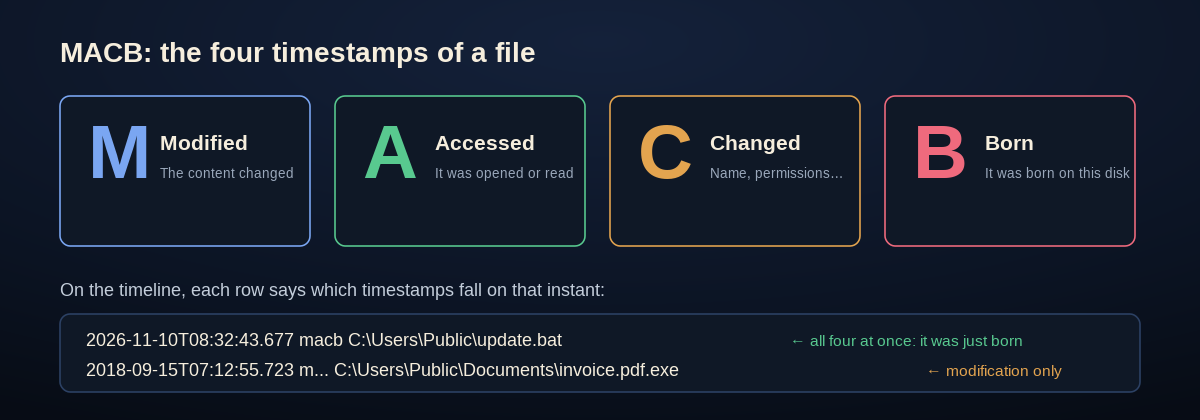
Every file has four timestamps, and the timeline has one row per distinct instant, with a mark saying which of them fall on it:
| Letter | Timestamp |
|---|---|
| M | Content modified |
| A | Last accessed |
| C | Record changed (metadata) |
| B | Created (birth) |
A macb row is a file to which everything happened in the same instant: it has just been born. An m... row is only a modification. Reading the column of letters from top to bottom is reading what happened to the disk.
What it found
I did not tell it what to look for. At the end of the run, this:
[ALERT] 2 file(s) `significant` by their rules (timestomping, name tricks):
[ALERT]   b_after_c+double_ext   C:\Users\Public\Documents\invoice.pdf.exe  (meta 532164)
A file called invoice.pdf.exe. The double extension is already enough to look at it. But the interesting part is its timestamps, which come out like this in the timeline:
2018-09-15T07:12:55  m...  C:\Users\Public\Documents\invoice.pdf.exe   unallocated
2026-11-10T08:32:43  .a.b  C:\Users\Public\Documents\invoice.pdf.exe   unallocated
By its modification time, the file is from 2018. By its creation time, it reached this disk on 10 November 2026. The two cannot be telling the same story. Someone gave it an old date so that, with the folder sorted by date, it would not stand out.
One nuance: the rule that fired, b_after_c, looks at another pair of timestamps. It compares the creation (B) with the record change (C), which is not in these two rows: the creation is later than that change, and that does not happen by itself.
And unallocated: the file is deleted. Its record is still in the $MFT because nothing has reused it yet.
So: an executable dressed up as a PDF, with a forged date, deleted afterwards. allymacb puts it at the top with a score of 70 and the explanation beside it:
rule double_ext (high): a document extension followed by an executable one;
rule b_after_c (medium): $SI creation after the record change time;
2 of the 1351 records changed in 2026-11-10T08 carry double_ext and no clean hour has that pattern
What was created in that second
This is where a timeline is worth more than an alert. Filter on that hour and look around:
2026-11-10T08:32:43.677  macb  C:\Users\Public\update.bat
2026-11-10T08:32:43.755  .a.b  C:\Users\Public\Documents\invoice.pdf.exe
Seventy-eight milliseconds earlier, update.bat is born in C:\Users\Public. That .bat is the same one faramir finds, in that same image, launched by a Run key and by a scheduled task.
Two tools, two sources of evidence that have nothing to do with each other, and the same file. The registry says it will run on every boot; the file system, when it arrived and what it came with.
How it catches forged dates
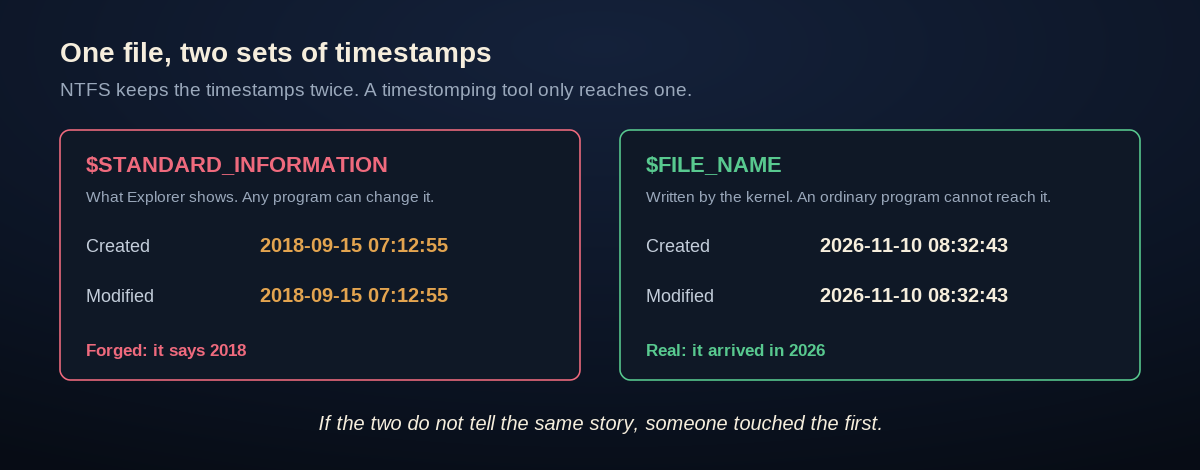
NTFS keeps each file’s timestamps twice: in $STANDARD_INFORMATION, which is what Explorer shows and what any tool can change, and in $FILE_NAME, which only the system touches. Timestomping tools change the first and leave the second. Compare them and the seam shows.
allymacb has twelve rules of that kind:
$SIearlier than$FILE_NAME.- Times in whole seconds, with no fraction. Tools tend to write round seconds; the system hardly ever does.
- Changes the USN journal saw and the timestamps deny.
- Name tricks: double extensions, right-to-left override characters.
All twelve, one by one, including the b_after_c that fired above, are in the timestomping rules.
What makes them useful is that each rule’s weight is measured, on clean Windows and Linux machines. Because $SI earlier than $FILE_NAME also happens to thousands of legitimate files: any installer that keeps the vendor’s original date produces it.
The hunt, and why it needs a past
Besides the rules there is a statistical hunt, with the same method as masstin’s: give it the date the incident started and it compares what was touched since then with everything the volume did before.
allymacb -f disk.E01 --investigation-from 2026-11-03 --hunt-out hunt.csv -o timeline.csv
--investigation-from is that start date. --hunt-out writes the findings table separately, to hunt.csv: one row per odd record of that period, significant ones first.
Here the result calls for honesty:
records: 3606 significant, 13474 candidate, 7962 habitual, 494260 baseline
3,606 significant records are too many to read. And sorted by folder, three in four are the same thing: 1,268 are in WinSxS, 346 in servicing and 1,157 in Program Files. They are Windows updates and software installed that week, with each file’s factory dates.
The reason is written in the explanation itself: “on 0 of 1 days”. The lab has only one day of normal activity before the date I gave it. With one reference day, any software install is something that “had never happened”.
It is not a fault in the tool. It is what happens when you ask for statistics without a past, and that is why the two things are separate: the rules work with no reference and gave two files, both right. The hunt needs weeks, just as in masstin.
What it does well even here is set the system’s installation aside:
p1 $MFT: installed from 2026-10-26T03:37:07Z to 2026-10-26T05:59:59Z, 493053 of 519302 records
87332 file(s) installed with their volume: the rules that fired on them add nothing
Of 519,302 records, 493,053 belong to the two and a half hours in which Windows was installed. allymacb works that out from the volume itself and marks them as reference. Otherwise every file of the operating system would be an alert.
The two lines count different things. The first, the records that changed during the installation. The second, the files of that installation on which some rule fired: those warnings are the ones that do not count.
Recovering what was deleted
With --carve it reads every sector looking for old $MFT records and $I30 index entries. On ext4 it replays the journal to put names to deleted files, and it recovers log lines and utmp records from free space.
allymacb -f disk.E01 --carve -o timeline.csv
It is slow, because it reads the whole disk, and it is for when you suspect something was deleted or the volume was reformatted.
The output
masstin’s 19 columns, each in the position of the one closest in meaning, and the same five at the end: hunt, hunt_score, hunt_why, verdict and notes. Lateral movement, persistence and file system of one case read side by side.
Nothing but the CSV goes to standard output, so it can be piped. This example is for a Unix-style shell (Linux, macOS, or Git Bash and WSL on Windows): grep filters lines, and the single quotes stop the shell from interpreting the $.
allymacb -f '$MFT' | grep ',unallocated,' > deleted.csv
The whole minute, seen by the four tools at once, is in How a case is read.
The code and the full documentation are on GitHub.
$ comments