
Often the case does not start from nothing. It starts with an alert: an address the firewall flagged, an account that turned up where it should not, a server with a webshell. You already have one point. What you want is everything that came out of it.
That is what --seed is for.
masstin -a graph-hunt-csv -f leoncorp.csv \
        --investigation-from "2026-11-10 00:00:00" \
        --seed 203.0.113.45 --report seed.md
A seed can be a machine name, an address or an account, and you can give several separated by commas. machine:account names both at once.
The data is the generated scenario from the hunt from the viewer: made up, with a scripted intrusion. The seed is the outside address that brute-forced SSH.
The command has no -o. Without it the findings table is not written: you get the report of --report, which --seed needs, and the timeline is annotated with the hunt’s columns, as always.
What comes back
Seeds: 1 matched, 6 movement(s) (29 session(s)) reconstructed over 6 machine(s)
And the report opens with the chain:
| # | Depth | First login | Origin | Account | Destination | Certainty | Follows |
|---|---|---|---|---|---|---|---|
| 1 | 1 | 01:39:12 | 203.0.113.45 | DEPLOY | LEO-LNX01 | 1 | seed |
| 2 | 2 | 01:52:03 | LEO-LNX01 | SVC_SQL@DEV | DEV-DC01 | 1 | hop 1 |
| 3 | 2 | 01:52:05 | LEO-LNX01 | SVC_SQL@DEV | DEV-SRV01 | 1 | hop 1 |
| 4 | 3 | 02:06:43 | DEV-SRV01 | SVC_SQL@DEV | PTR-SRV01 | 1 | hop 3 |
| 5 | 3 | 02:20:11 | DEV-SRV01 | RYAN_DEVLEAD@DEV | DEV-DC01 | 1 | hop 3 |
| 6 | 2 | 03:50:08 | LEO-LNX01 | ADMINISTRATOR@DEV | LEO-FS01 | 1/2 | hop 1 |
Six hops over six machines, from a single IP address.
Two columns that do not explain themselves:
- Depth is how many hops from the seed that login is. The seed’s own is 1.
- Follows says which hop it hangs from: the one by which the machine it leaves from was entered.
That is why hop 6 has depth 2 although it is the last in time. It leaves from LEO-LNX01, the machine entered in hop 1, like hops 2 and 3. The number in the first column goes by time, not by depth.
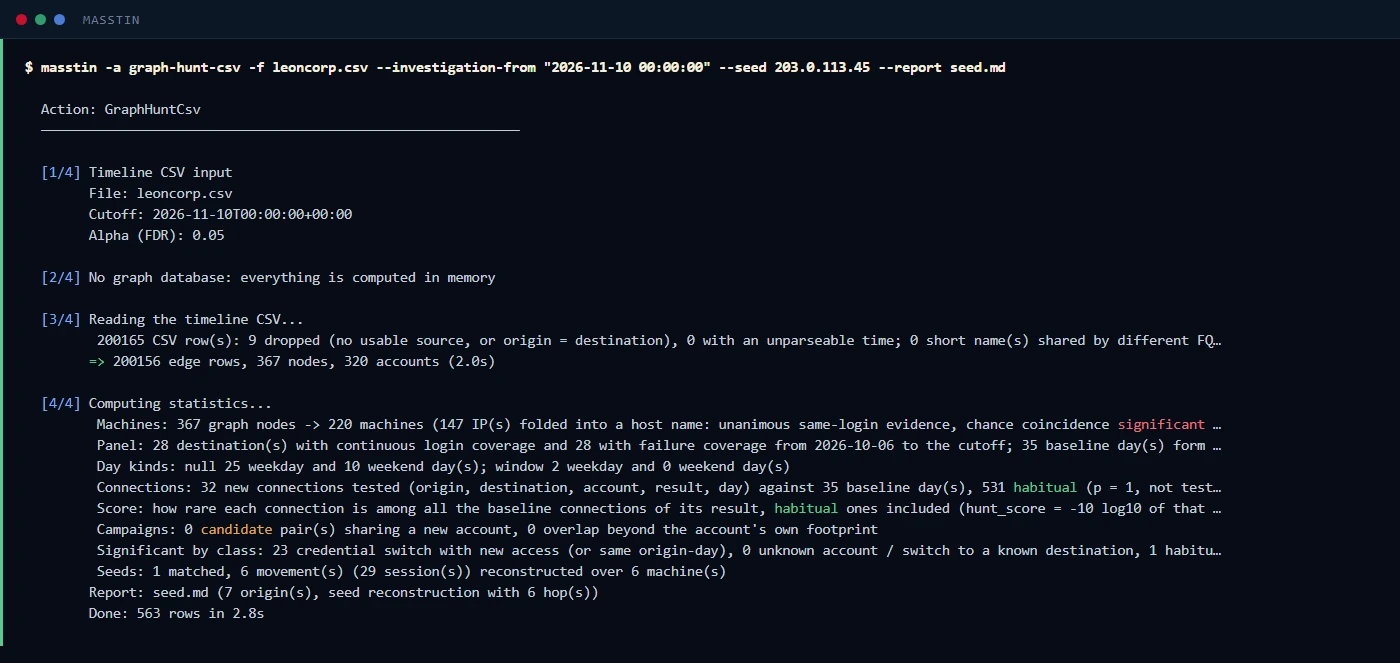
A hunt with one seed on the lab timeline: the Seeds line says the given address was found and that 6 movements over 6 machines were reconstructed from it. The detail is in the report.
How it follows the trail
The rule is conservative on purpose, and it is worth understanding.
It starts with the seed’s logins. Here, 203.0.113.45 entering LEO-LNX01 as deploy.
From each machine it enters, it follows only while that session is open. From its logon to its logoff, or to the end of the day if the logoff was not recorded. In that second case the chain may pick up more than it should; I come back to it at the end. A login leaving LEO-LNX01 three days later is not part of the chain.
And it does not follow just any login. Only those that are new connections or that use an account the chain had already used. The everyday traffic of a server that was there before the attack is not pinned on the attacker.
Look at hop 4: DEV-SRV01 → PTR-SRV01 as SVC_SQL. The hunt has it as habitual: that service account makes that connection every day. On its own it would never have flagged it. The chain picks it up because it uses an account the attacker already had in hand. And that hop is the way into the partner’s domain.
It is the example of why seeds see things statistics cannot: a perfectly normal action, done by the wrong person.
The certainty
The most honest column in the table. It is 1 divided by the sessions open on that machine at that moment.
On the first five hops it is 1: when that login left, the only session open on the origin was the attacker’s. There is no other explanation.
On the sixth it is 1/2. At 03:50 there were two sessions open on LEO-LNX01, and the login to LEO-FS01 could have come from either. masstin neither hides it nor rounds it: it tells you it is one chance in two.
That is the number to take to the report. “The attacker accessed the file server” is one sentence. “The file server was accessed from the compromised server while two sessions were open on it, one of them the attacker’s” is another, and the second is the one that survives a review.
What comes with the chain
Below the table, the report adds three things.
The failed attempts of the chain’s machines. What the attacker tried and did not get:
203.0.113.45 -> LEO-LNX01: 184 failed attempt(s) between 01:13:00 and 01:37:21
DEV-SRV01 -> DEV-BUILD01: 1 failed attempt(s) at 02:31:02
DEV-SRV01 -> LEO-BKP01:   1 failed attempt(s) at 02:31:07
DEV-SRV01 -> LEO-FS01:    1 failed attempt(s) at 02:31:00
DEV-SRV01 -> LEO-PRN01:   1 failed attempt(s) at 02:31:19
DEV-SRV01 -> PTR-FS01:    1 failed attempt(s) at 02:31:02
This shows the 184 failures from that address, with every user name it tried. In the hunt report the same brute force appears as 73, which are only those of the account it finally got in with.
Twenty-four minutes of brute force, and then five attempts in twenty seconds from the SQL server against five different machines. Someone trying a freshly stolen credential to see where it opens. That is scope too: those are the machines the attacker wanted to touch.
What was open on the seed when it began to act. In case the seed is not the beginning but a step in the middle.
Two Cypher queries. Cypher is the query language of graph databases such as Neo4j and Memgraph, which store machines as nodes and connections as relationships between them. One draws exactly those hops. The other returns everything that happened between the chain’s machines in that period, to check it. If you do not use a graph database, the same can be seen in the viewer.
Seeds that already existed
A detail that avoids many false positives. If the seed is a machine that was already in the reference (a jump server, say), the chain starts only with its new connections. Its routine is listed, but not followed.
If the seed had never been seen, as here, it starts with everything it did.
And to narrow it further: --seed-from and --seed-to bound which logins can start the chain. Both take a date and time in UTC, written as "YYYY-MM-DD HH:MM:SS". Left out, they stand for the start and the end of the investigated period.
From the viewer
The same thing is in the second step of the hunt wizard: the Known compromised box. Type the seeds there and the report comes out with the reconstruction at the top.
When to use it and when not
Use it when you have a reliable starting point. The reconstruction is as good as the seed: give it a machine that was not compromised and it will return, with a straight face, its administrator’s “chain”.
And remember what it depends on: the logoffs being in the timeline. Without the 4634 or the 4647, or without the end of the SSH session, the session counts as open until the end of the day, and the chain may pick up more than it should. The certainty column drops when that happens. Look at it.
$ comments