“What ran?” is the most repeated question of an investigation and the one with the most scattered answer. Windows records executions in a dozen places that do not talk to each other: the security log if auditing was on, Prefetch, ShimCache, Amcache, SRUM, UserAssist, scheduled tasks, services, the PowerShell history. Each knows a part. None knows it all.
caarea reads all of them and sorts them into one timeline.
caarea -f server.E01 -o server.csv --hunt
caarea over a Windows triage and a Linux host: it reads the sources, writes the timeline and ends with the rows worth reading first.
What it reads
More than sixty sources:
- Event logs: process creation (4688), Sysmon, PowerShell with its script blocks, services, scheduled tasks, WMI, AppLocker, Defender, BITS.
- Windows files: Prefetch, SRUM, Amcache, Jump Lists, shortcuts, task XML, the WMI repository, the PowerShell console history.
- Registry: BAM, ShimCache, services, Run keys, UserAssist, RunMRU and a few more.
- NTFS: from the
$MFTand the USN journal, the executables and scripts written outside the system folders. - Linux:
pacct,auditd, the systemd journal,auth.log, shell histories, package managers, cron, containers.
If any of those names is new to you, in one line each:
- 4688: the event the security log records every time a process is created, if auditing is on.
- Sysmon: a free Microsoft tool that records process creations and other activity in its own log.
- Prefetch: files Windows writes to start programs faster. They keep the program’s name, how many times it ran and the latest times.
- ShimCache: a registry list, meant for application compatibility, of executables the system has seen.
- Amcache: a hive (
Amcache.hve) with the programs and executable files that have passed through the machine, with their path and hash. - SRUM: a database of what each application uses (network, CPU), hour by hour.
- UserAssist: a registry key in each user’s hive with the programs that user opened from the desktop.
- BAM: a registry key with the last time each user ran each program.
And the containers of all that: E01, raw, VMDK and VHD/VHDX images, with their shadow copies; KAPE, Velociraptor, UAC, Cortex XDR and CyLR triages; plain folders.
I gave it our lab’s whole case: a 50 GB image, four Windows triages, a folder of logs and two Linux triages. That run is not the command above, which reads a single image: it is done with -d and the case folder, instead of -f and one file. This is how it ends:
Extracted a total of 49587 execution events.
Hunt: 1742 findings saved to: caso.hunt.csv (1722 timeline rows judged: 85 significant, 1555 candidate)
49,587 rows in two minutes. The heaviest: 9,049 from the scheduled-task log, 6,317 from the USN journal, 3,412 process creations, 2,545 from Amcache.
On the hunt line, significant and candidate do not add up to all the judged rows. The missing ones are the habitual rows: what a clean reference machine also runs. What each state means is in the hunt scale.
One execution told by six sources
What makes putting it all together useful shows in an example. On the lab’s server, on 10 November at 08:32:43, this happens. Each line comes from a different source (there are five here; the sixth comes in the next block):
08:32:43.677  ntfs:mft:created   C:\Users\Public\update.bat   File created: size 76; content: @echo off ...
08:32:43.677  registry:runkeys   Updater                       Run\Updater, Cmd: C:\Users\Public\update.bat
08:32:43.693  evtx:4688          schtasks.exe                  /create /tn "RF Updater" /tr C:\Users\Public\update.bat /sc daily /st 03:00
08:32:43.724  registry:tasks     C:\Users\Public\update.bat    Task: \RF Updater
08:32:43.730  evtx:4698          \RF Updater                   C:\Users\Public\update.bat
In 53 milliseconds: a .bat is born in a public folder, a Run key points at it and someone creates a daily scheduled task that launches it. The $MFT gives the birth and, because the file is so small that its content fits in the record itself, what is inside it too. The registry gives the key. The security log gives the exact command line and the account that typed it.
And two and a half minutes later:
08:35:12.369  evtx:shell:9707    update.bat                    Run command started: update.bat
08:35:12.396  evtx:4688          cmd.exe  (explorer.exe)       cmd.exe /c "C:\Users\Public\update.bat"     DEV\ryan.devlead
Another user logs on and the Run key does its job: explorer.exe launches the .bat under the account that has just come in.
None of those sources tells the story alone. The 4688 does not know the file had just been created. The $MFT does not know who created it. The Run key does not know whether it ever ran. Sorted by time in the same CSV, they do.
The process tree
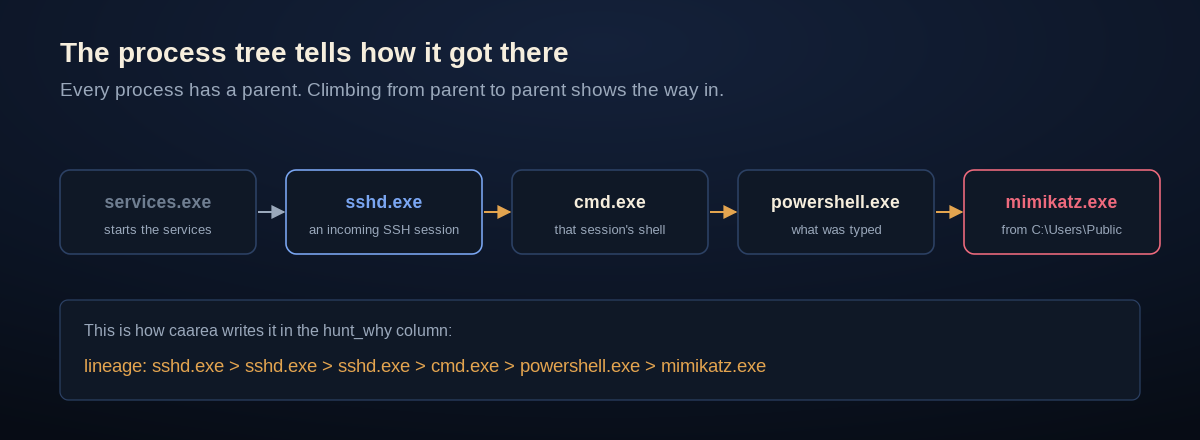
With --hunt, caarea first rebuilds each machine’s process tree, from the creator PIDs given by 4688, Sysmon, auditd and pacct. Every judged row carries its lineage:
lineage: sshd.exe > sshd.exe > sshd.exe > cmd.exe > powershell.exe > mimikatz.exe
At a glance: nobody sitting at the machine launched that binary, it came through an SSH session. (This example is about another binary of the lab, not the invoice.pdf.exe that comes further down. In the lab that mimikatz.exe is a renamed copy of whoami.exe. caarea does not know that, and it is right not to trust the name either way: it flags the row for the folder it runs from, not for what it is called.)
One detail: a parent is the latest start of that PID before the child. If the creating process had already exited, caarea says so instead of guessing. A reboot closes every PID, so a service does not inherit as its parent whatever held that number before the restart.
What it flags
The rules come in three families:
- Lineage. A core Windows process with a parent that is not its own. Office, a browser, a web server or a database launching a shell.
services.exestartingcmd.exeas a service. A secondlsass. - Names. A binary with a system name outside its folder. A name one character away from a legitimate one. A double extension. Randomly generated names.
- Folders. Run or written in
Users\Public, the root ofProgramData, the Recycle Bin,Temp,/dev/shm,/tmp, the web root.
The tables of expected parents and children are nobody’s opinion: they come from the SANS Hunt Evil poster, cross-checked with Elastic’s equivalent rule. Neither is each rule’s score: it is how rare the rule turned out to be on clean machines, measured by a script.
This is the first thing the console shows at the end:
significant  78  (7 rows)   C:\ProgramData\svch0st.exe
    NAM-LOOKALIKE (high): svch0st.exe imitates svchost.exe (homoglyph) [T1036.005]
    PATH-SCRATCH (medium): svch0st.exe was written to ProgramData [T1036]

significant  78  (10 rows)  C:\Users\Public\Documents\invoice.pdf.exe
    NAM-DOUBLE-EXT (high): invoice.pdf.exe looks like a .pdf file but is .exe [T1036.007]
    PATH-SCRATCH (medium): invoice.pdf.exe was written to Users\Public [T1036]
A svch0st.exe with a zero in place of the o, in the root of ProgramData. And the same invoice.pdf.exe that allymacb finds by its forged dates. Equal rows are grouped: ten rows about the same file take one place, not ten.
The ten rows of invoice.pdf.exe are also its whole biography: created at 08:32:43, run three times from PowerShell (08:32, 08:37 and 08:40), present in ShimCache, present in the shadow copy, and deleted at 19:47:26, according to the USN journal.
What was deleted
Of the 49,587 rows, 1,180 are about deleted things and 1,136 exist only in a shadow copy. By default caarea reads the free cells of the registry and the unused records of the $MFT, and every row says how it was obtained in its state column: live, vss, deleted, txlog or carved.
It also repairs dirty hives before reading them. On this image it replayed the transaction logs of SECURITY, of Amcache and of two NTUSER.DAT files. Without that step the latest changes are missing, and those tend to be the incident’s.
--carve goes further: it walks the bytes of the image (or of a pagefile, or of a memory dump) looking for hives, event log chunks, $MFT records and Prefetch files that nothing points to any more.
What not to take at face value
The hunt’s figures in this run, looked at one by one:
Of the 85 significant rows, 29 are the two binaries above: the 17 shown in the console and another 12 from their deleted copies, which come out as separate entries. A good part of the rest is one rule (NAM-SYSTEM-PATH, a system binary outside its folder) firing where it should not: on files whose folder could not be rebuilt and shows as [UNKNOWN], on a shortcut that writes the path as My Computer\C:\..., and on UserAssist entries with {System}\notepad.exe. In all three the binary is where it belongs; what fails is the way the path arrives written. They are quick to dismiss, but you need to know.
Of the 1,555 candidates, 1,367 are one single thing: a lab script in Users\Public that a scheduled task launches over and over. The console counts it as one entry with its number of repetitions, so in practice it is read once.
Take those away and fewer than three hundred rows are left, with what matters among them. As in the rest of the family: they are leads in order, not verdicts.
And one limit that does not depend on caarea: on a Windows machine with the default audit policy there is no 4688, and without command-line auditing the 4688 arrives without it. The lineage rules need a source that names the parent. The name and folder rules work with any source, Prefetch or ShimCache included.
Narrowing it down
For a large image with a known suspicious hour:
caarea -d triage -o out.csv --toi 2026-11-10T08:30:00Z --toi-window 6
--toi stands for time of interest: the moment you care about, which is the centre of the window. --toi-window is the hours on each side: here, six hours before and six after. Rows outside it still feed the process tree; they just are not written.
On Linux, logs that only carry local time are corrected to UTC with the machine’s own time zone, which caarea looks for in the evidence.
The output
The 19 columns of the rest of the family: when, on which machine, from which source, under which account, which image, which parent, which command line, which file it was read from, and the five at the end (hunt, hunt_score, hunt_why, verdict, notes).
With masstin’s logins beside it, the lineage above is completed: caarea says the binary came in over SSH, and masstin, from which machine that session was opened and with which account.
The whole minute, seen by the four tools at once, is in How a case is read.
The code and the full documentation are on GitHub.
$ comments