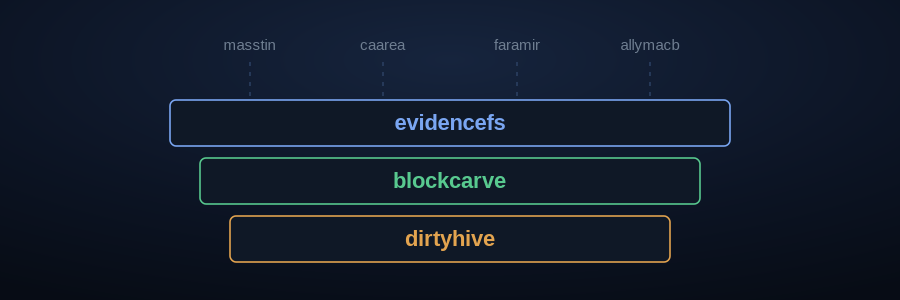
Every tool on this page accepts the same things: an E01 image, a VMDK, a triage in a zip, a folder. And they all recover deleted things the same way. That work has been moved out of the tools into three libraries, to do it only once.
The three are not at the same point:
| Library | What it does | Who uses it today |
|---|---|---|
| blockcarve | Recovers deleted structures | The four main tools |
| evidencefs | Opens the evidence | etcdump and the tools in preparation |
| dirtyhive | Reads the registry | The tools in preparation |
evidencefs and dirtyhive grew out of masstin’s and faramir’s code. The four main tools still keep their own readers, which is where the libraries came from.
They are public and can be used on their own. This article is for anyone who wants to know what is underneath, or who writes their own tools in Rust and does not want to write an E01 reader again. If you are starting out and only want to use the tools, you can skip it: you do not need it to follow the others.
A note for those who will write code: the snippets below are fragments, without their use lines. The complete examples are in each library’s README. And each has its own OpenOptions type: the one in evidencefs and the one in dirtyhive are not the same.
evidencefs: one way to open evidence
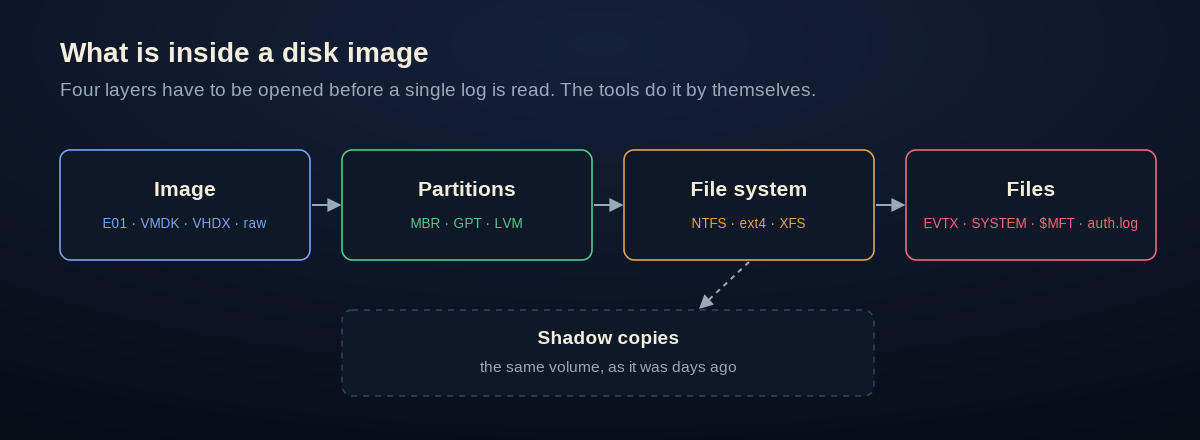
The problem it solves is dull and huge. Before a single log is read you have to know whether the input is an image or an archive, what format it is, which partitions are inside, which of them hold a file system that can be read, whether there are shadow copies, whether the zip is a KAPE or a Velociraptor triage and where the Windows root is inside it.
evidencefs takes a path and returns a list of mounts: read-only file systems that are all walked the same way, wherever they come from.
let ev = Evidence::open("disk.E01".as_ref(), &OpenOptions::default())?;
println!("{}", ev.describe());
// disk.E01: image (E01), 59.9 GB (3 segment(s)), host WS01
//   partition 0: NTFS at 0x100000 (99.0 MB, gpt, "System Reserved")
//   partition 1: NTFS at 0x6500000 (59.8 GB, gpt, "Basic data partition")
//   mount partition_1: NTFS "OS" [windows root /]
//   mount partition_1_vss_0: NTFS "OS" [vss:0:2026-10-29 01:57:43] [windows root /]
The last line is the one that matters: the shadow copy shows up as one more mount, with the volume as it was at snapshot time. For the tool on top, reading the SYSTEM hive of two weeks ago is the same as reading today’s.
What it opens:
| Layer | Formats |
|---|---|
| Images | E01/Ex01, raw and split raw, VHD, VHDX, VMDK |
| Partitions | MBR, GPT, volumes with no table |
| Containers | LVM2, NTFS shadow copies |
| File systems | NTFS, ext2/3/4, XFS, FAT, exFAT, folders, zip |
| Archives | zip and tar read in place; tar.gz, tar.bz2 and tar.xz decompressed once |
| Triages | KAPE, Velociraptor, CyLR, UAC, Cortex XDR |
Two decisions you notice in use:
Nothing is extracted file by file. A compressed archive is decompressed into a single temporary .tar and read from there. A triage with attacker tooling inside does not end up with those files loose on the analyst’s disk, where an antivirus would quarantine them halfway through the run.
Nothing is dropped silently. A BitLocker volume, an unsupported file system or a differencing disk is listed with a code (EF###) that says what it is and what to do. What a tool could not read is case information.
Deleted files are paths too: the unused $MFT records that still have a name, and on ext4 what the journal still describes, appear under a virtual /$DELETED/ folder and are read like any other.
blockcarve: looking for structures where there are no files left
When a file is deleted and the file system forgets it, the bytes stay on the disk until something overwrites them. Recovering them means walking the whole image looking for signatures, and any carving tool does that. The hard part is not returning rubbish.
blockcarve reads in 4 MB blocks, looks for candidates at sector alignment and, before accepting one, makes it prove it is what it claims to be:
- A registry hive is followed bin by bin from its header and its root key is checked. Bins are the blocks a hive is divided into inside.
- An event log chunk has to pass its CRC32 checksums. A CRC32 checksum is a number computed from the data: if the data is not the original, it does not match.
- An
$MFTrecord has to have its geometry and its fixups in order. Fixups are control bytes NTFS puts at the end of every sector of the record.
A signature that turns up by chance in the middle of a video file passes none of those tests.
It also knows about damaged disks. A broken E01 segment can leave a decompressor spinning forever, so every read runs with a time budget: if it is exceeded, that window is skipped, noted, and the scan goes on. A read failure costs a piece, never the run.
It is what sits behind --carve in masstin (event logs), faramir (hives), allymacb ($MFT records and indexes) and caarea (all of those, Prefetch and a few more structures; the full list is in the carving article). They all accept a structure for the same reasons.
The two registry pieces they all share live in it too: the walk of a hive’s free cells, which is where deleted keys come from, and the replay of the transaction logs.
dirtyhive: the registry the way an analyst needs it
A registry hive copied from a running machine is hardly ever complete. Windows does not write changes to the file at once: it notes them first in transaction logs (.LOG1, .LOG2) and moves them into the hive later. Read the hive without those logs and you read the registry of a while ago, missing exactly the latest part.
dirtyhive does four things, in order:
- Reads the header and decides which hive it is from what it says inside, not from what the file is called. A
bob_NTUSER.DATor aC_Windows_System32_config_SOFTWAREis what it is. - Finds the logs, even when the collector renamed them or moved them to another folder, and tells two users’ logs apart by the hive name each log carries inside.
- Replays them in memory, validating every entry. A truncated log is applied as far as it is sound; one full of garbage cannot bring the program down.
- Walks the free cells and returns the deleted keys and values, with their path rebuilt.
The engine that replays the logs is blockcarve’s. Finding it in a carving library may be a surprise: it is there because, as said above, blockcarve holds the two registry pieces all the tools already shared. dirtyhive reuses them instead of writing them again. That engine is checked against the hives Windows 10 and Windows 7 recovered themselves in yarp’s public test corpus: the result matches.
In our lab’s case, on a server’s image, that same engine is what you see at work: caarea replayed the logs of SECURITY, of Amcache and of two NTUSER.DAT files before reading them, and faramir pulled 711 deleted keys out of SOFTWARE alone. dirtyhive is that way of reading a hive, taken out of faramir and put into a library for the new tools. In the snippet, path is the path to the hive file:
let opts = OpenOptions::new().search_root("D:/evidence/host01");
let mut hive = Hive::open(path, &opts)?;
println!("{}", hive.info().summary());   // SOFTWARE [dirty, 2 log(s) applied]

for d in hive.deleted() {
    if let Deleted::Key(k) = d {
        println!("deleted key {} ({} values)", k.path, k.values.len());
    }
}
Why it matters that they are shared
There is a practical reason and a forensic one.
The practical one: a new image format or a fix in the shadow copy reader reaches every tool at once.
The forensic one: if two tools read the same image with two different readers, sooner or later they disagree, and in a report a disagreement between your own tools is hard to explain. With the same code underneath, when faramir says a key was deleted and caarea says the same, they say it for the same reason. That is already so for carving and for the registry, and it is the reason for taking image reading to a single place as well.
What they do not do yet
- evidencefs does not read APFS, HFS+ or btrfs, nor differencing disks (it refuses them with a code that says to merge them). BitLocker volumes are detected and listed, not decrypted.
- With
--carve, the tools only recover structures that carry their own timestamp inside. Something without a time recovered from free space cannot be put on a timeline. - masstin, faramir, caarea and allymacb do not read images through evidencefs yet: they use their own code, which is where the library came from.
All three are on GitHub, under AGPL-3.0: evidencefs, blockcarve and dirtyhive.
$ comments