The problem
Attackers clear Windows event logs. But if Volume Shadow Copies exist on the disk, the old logs are still there — frozen in time. The challenge: existing tools can’t access them easily.
| Tool | Limitation |
|---|---|
| vshadowmount | Requires FUSE, Linux only |
| EVTXECmd –vss | Requires Windows VSS COM API, live systems only |
| Both | Cannot read from E01 forensic images directly |
What is vshadow-rs?
A pure Rust library and CLI tool that reads the VSS on-disk format directly from E01, raw/dd, partition images, or mounted volumes. No Windows APIs, no C dependencies, works on Windows, Linux, and macOS.
Its logo is Ferris (the Rust crab) wearing a miner’s helmet — a nod to the coal miners of Leon, Spain, who dug through layers of darkness to bring what was hidden to the surface.
- Repository: github.com/jupyterj0nes/vshadow-rs
- Crate: crates.io/crates/vshadow
- License: AGPL-3.0
Key Features
| Feature | Description |
|---|---|
| Inspect VSS stores | List all shadow copy snapshots with GUIDs, creation times and delta sizes |
| List files | Browse NTFS directories inside any VSS store or the live volume |
| Delta detection | Compare VSS snapshots against the live volume — find deleted and changed files |
| MACB timelines | Generate forensic timelines from the delta with full NTFS timestamp precision |
| Extract files | Extract files from VSS stores to disk — recover deleted event logs |
| E01 support | Read directly from Expert Witness Format images, no ewfmount needed |
| Mounted volumes | Read directly from drive letters (C:), block devices (/dev/sda2) or mount points (/mnt/evidence) — no need to image the disk first |
| Auto partition detection | Finds NTFS partitions automatically via GPT and MBR partition tables |
| Cross-platform | Windows, Linux and macOS — single binary, zero dependencies |
| Library + CLI | Use as a Rust crate or as a standalone command-line tool |
Install
Download pre-built binary (recommended)
No Rust toolchain needed. Just download and run.
| Platform | Download |
|---|---|
| Windows | vshadow-rs-windows.exe |
| Linux | vshadow-rs-linux |
| macOS | vshadow-rs-macos |
Go to Releases and download the binary for your platform. That’s it.
Build from source (alternative)
cargo install vshadow
CLI Usage
All commands accept forensic images (E01, dd/raw) and mounted volumes/disks (drive letters on Windows, /dev/ devices or mount points on Linux/macOS).
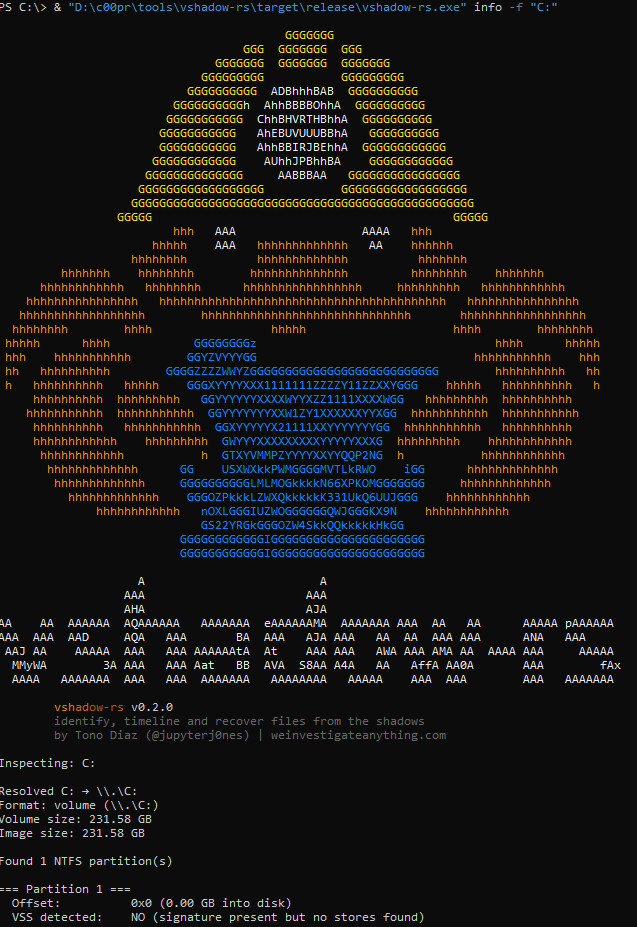
Inspect: find VSS stores
# From forensic image
vshadow-rs info -f evidence.E01

# From mounted volume (Windows — requires Administrator)
vshadow-rs info -f C:

# From block device (Linux — requires root)
sudo vshadow-rs info -f /dev/sda2
sudo vshadow-rs info -f /mnt/evidence
List: browse files in a VSS store or live volume
# Live volume
vshadow-rs list -f evidence.E01 --live -p "Windows/System32/winevt/Logs"

# VSS store 0
vshadow-rs list -f evidence.E01 -s 0 -p "Windows/System32/winevt/Logs"
List-delta: find what changed between VSS and live volume
This is what makes vshadow-rs unique. It compares the snapshot filesystem against the live volume and shows only the files that were deleted or changed.
# Show delta for all VSS stores
vshadow-rs list-delta -f evidence.E01

# Focus on event logs only
vshadow-rs list-delta -f evidence.E01 -p "Windows/System32/winevt/Logs"

# Export delta to CSV
vshadow-rs list-delta -f evidence.E01 -o delta.csv
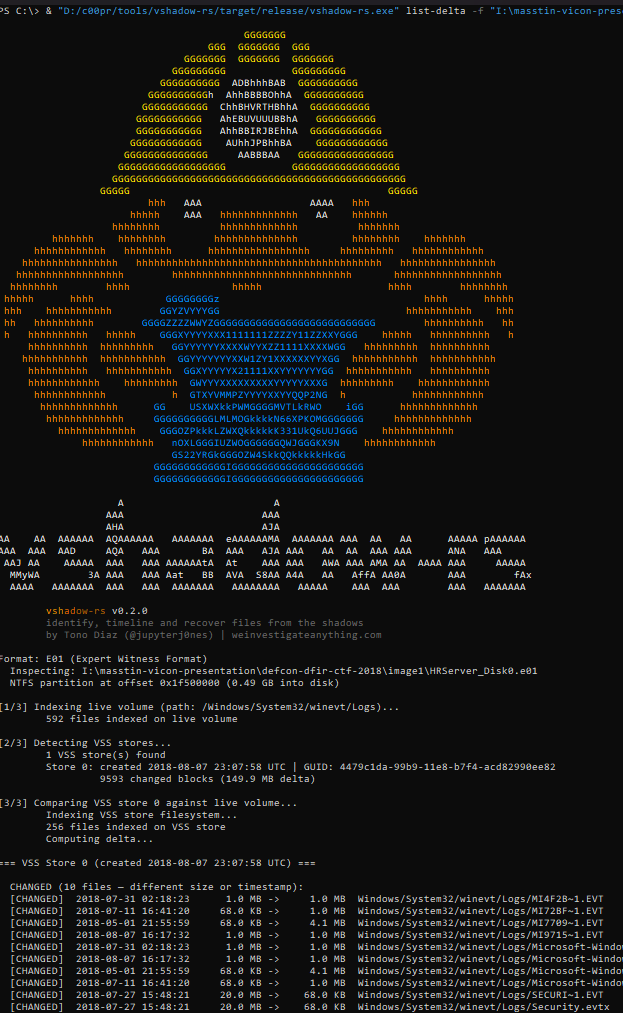
The output shows each changed file with its size on the live volume vs. the VSS store, making it immediately obvious when logs have been cleared.
Extract: recover files from VSS stores
vshadow-rs extract -f evidence.E01 -s 0 -p "Windows/System32/winevt/Logs" -o ./recovered/
Timeline: generate MACB timeline from VSS delta
Generates a full MACB (Modified, Accessed, Changed, Born) timeline CSV from the delta — only files that exist in VSS but not on the live volume, or that changed.
# Expanded format: 8 rows per file (SI + FN timestamps)
vshadow-rs timeline -f evidence.E01 -o timeline.csv

# MACB format: 1 row per file with MACB flags
vshadow-rs timeline -f evidence.E01 --format macb -o timeline.csv

# Include live volume in the timeline
vshadow-rs timeline -f evidence.E01 --include-live -o timeline.csv
Typical forensic workflow
# 1. Check for VSS stores
vshadow-rs info -f suspect.E01

# 2. Find what changed between VSS and live volume
vshadow-rs list-delta -f suspect.E01 -p "Windows/System32/winevt/Logs"

# 3. Extract pre-deletion logs from VSS
vshadow-rs extract -f suspect.E01 -s 0 -p "Windows/System32/winevt/Logs" -o ./recovered/

# 4. Generate a timeline of deleted/modified files
vshadow-rs timeline -f suspect.E01 -o timeline.csv

# 5. Parse recovered logs with masstin
masstin -a parse-windows -d ./recovered/ -o lateral.csv
What makes vshadow-rs unique
-
Delta detection (
list-delta): no other tool compares VSS snapshots against the live volume to show exactly what changed. This is the fastest way to find cleared logs, deleted files, and tampered evidence. -
MACB timelines from shadows (
timeline): generate forensic timelines from the delta — only the relevant changes, not the entire filesystem. -
Direct E01 support: read forensic images without mounting, converting, or extracting.
-
Mounted volume / live disk support: point vshadow-rs at a drive letter (
C:,D:), a block device (/dev/sda2), or a mount point (/mnt/evidence) and it reads the raw volume directly. No need to image the disk first — ideal for triage or when working with a write-blocker. -
Pure Rust, cross-platform: no FUSE, no Windows APIs, no C libraries. Works on any OS.
-
Library + CLI: use the
vshadowcrate in your own Rust tools, or use thevshadow-rsbinary from the command line.
Comparison with existing tools
| Feature | libvshadow (C) | vshadowmount | vshadowinfo | vshadow-rs |
|---|---|---|---|---|
| Language | C | C (libvshadow) | C (libvshadow) | Rust |
| List VSS stores | Yes | No | Yes | Yes |
| Show GUIDs, dates | Yes | No | Yes | Yes |
| Show delta size | No | No | No | Yes |
| Mount as FUSE filesystem | No | Yes | No | No |
| List files in VSS store | No | Via mount | No | Yes |
| Extract files from VSS | No | Via mount | No | Yes |
| Compare VSS vs live (delta) | No | No | No | Yes |
| MACB timeline from delta | No | No | No | Yes |
| List files in live volume | No | No | No | Yes |
| Read E01 directly | No | No | No | Yes |
| Read mounted volumes / live disks | No | No | No | Yes |
| Auto-detect GPT/MBR | No | No | No | Yes |
| No C dependencies | No | No | No | Yes |
| No FUSE required | Yes | No | Yes | Yes |
| Cross-platform | Linux/Mac | Linux only | Linux/Mac/Win | Win/Linux/Mac |
libvshadow is the reference C library by Joachim Metz. vshadowmount and vshadowinfo are its CLI tools. vshadow-rs is a completely independent implementation in Rust — it does not use libvshadow.
How VSS works
Volume Shadow Copy uses a copy-on-write mechanism at the block level (16 KiB blocks):
- Snapshot creation: the catalog records metadata (GUID, timestamp)
- Block modification: when a block is about to be overwritten, the old data is copied to a store area first
- Reconstruction: read from the store for changed blocks, from the live volume for unchanged blocks
vshadow-rs parses the on-disk structures: volume header at 0x1E00, catalog (linked list of 16 KiB blocks), and block descriptors (32-byte entries mapping original offsets to stored data).
Library Usage
use vshadow::VssVolume;

let mut reader = /* any Read+Seek source */;
let vss = VssVolume::new(&mut reader)?;

for i in 0..vss.store_count() {
    let mut store = vss.store_reader(&mut reader, i)?;
    // store implements Read + Seek — pass to ntfs crate
}
Integration with masstin
Masstin uses vshadow-rs to process forensic images with a single command:
masstin -a parse-image-windows -f evidence.E01 -o timeline.csv
This extracts EVTX from both the live volume and all VSS snapshots, generating a unified lateral movement timeline that includes events the attacker deleted.
Future Work
- VMDK / VHD / VHDX support: read VSS from virtual machine disk images directly
- Multi-store delta: compare across multiple VSS snapshots to build a full change history
- Deleted file recovery: detect and recover files that were deleted between snapshots using MFT analysis
- Integration with Plaso/log2timeline: export timelines in formats compatible with existing DFIR toolchains
- AFF4 support: read from AFF4 forensic images
$ comments