
This page is for looking things up. It lists the places where faramir looks for persistence, grouped by the idea behind each, with its ATT&CK technique.
Two notes for reading the tables:
- ATT&CK is MITRE’s public catalogue of attack techniques. Each technique has an identifier, such as T1547.001, which you can look up at attack.mitre.org to see what it consists of.
- What is in
code typeis the name of the registry key or value (or of the file) that is checked. You do not need to know the full path: every row of the timeline says, in its last event column, which file and which key it was read from. The tables with no “Where” column are the ones that already name the place in the first.
First, a figure to get your bearings. In our lab’s case (seven machines) 6,162 entries of 41 different kinds came out. This is how the most numerous are spread:
| Kind | Entries |
|---|---|
| Windows services | 2,745 |
Service ServiceDll |
883 |
| Scheduled tasks (registry and XML) | 900 |
| systemd services, sockets and timers | 521 |
| Group Policy extension DLLs | 263 |
| Shell extensions | 211 |
| netsh helpers | 160 |
| Run keys | 6 |
Nearly 60 % of the entries are services and their DLLs. Run keys, which is where anyone looking by hand starts, are six entries in six thousand. What the lab planted was in one of those six and in one of the 900 tasks.
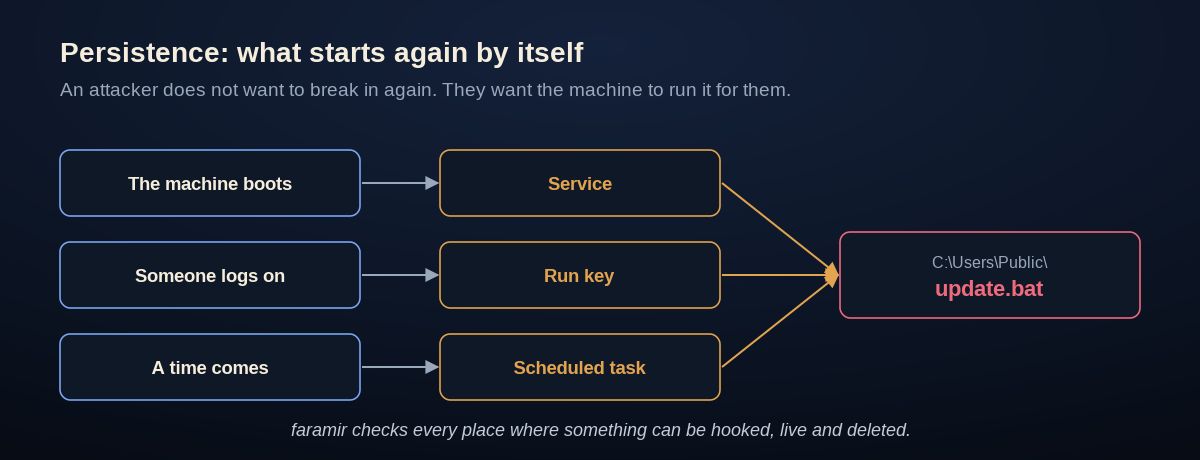
Autostart
What runs at power-on or at logon, with no further conditions.
| What | Where | ATT&CK |
|---|---|---|
| Run, RunOnce, RunEx, RunOnceEx keys | HKLM, the 32-bit view and every user profile | T1547.001 |
| Startup folders | The files in each Startup folder | T1547.001 |
| Redirected Startup folder | Shell Folders pointing the folder somewhere else |
T1547.001 |
Policies\Explorer\Run |
The policy Run key | T1547.001 |
| Active Setup | StubPath |
T1547.014 |
| Screensaver | SCRNSAVE.EXE per user |
T1546.002 |
Windows\Load and Windows\Run |
Explorer’s legacy keys | T1547 |
cmd.exe AutoRun |
Runs every time a console is opened | T1546 |
| PowerShell profiles | Every *profile.ps1 |
T1546.013 |
| Windows Terminal | startOnUserLogin |
T1547 |
Logon and credentials
Places loaded inside the logon process. Whoever settles here usually sees passwords.
| What | Where | ATT&CK |
|---|---|---|
| Winlogon | Userinit, Shell, mpnotify, Notify |
T1547.004 |
| Logon script | UserInitMprLogonScript |
T1037.001 |
| LSA packages | Authentication, security and notification | T1547.002, T1556.002 |
| Security providers | SSP DLLs beyond the stock ones | T1547.005 |
| Network providers | NetworkProvider\Order and each one’s DLL |
T1556.008 |
| Credential providers | Those that are not Microsoft’s | T1556 |
| Remote desktop | InitialProgram, StartupPrograms |
T1547 |
| Safe mode | AlternateShell |
T1547 |
Services and tasks
| What | Where | ATT&CK |
|---|---|---|
| Services | ImagePath of every service in the active ControlSet |
T1543.003 |
| Service DLL | ServiceDll, on the service and in Parameters |
T1543.003 |
| Failure command | FailureCommand: what runs if the service crashes |
T1543.003 |
| Scheduled tasks | The registry cache and the XML on disk | T1053.005 |
BootExecute |
What runs before Windows starts | T1542.003 |
| Group Policy scripts | Startup, shutdown, logon and logoff | T1037.001 |
DLLs someone else loads for you
They run nothing by themselves: they get a legitimate process to load a DLL.
| What | ATT&CK |
|---|---|
AppInit_DLLs (honouring whether it is enabled) |
T1546.010 |
AppCertDlls |
T1546.009 |
COM hijacking: InprocServer32 in the user’s classes |
T1546.015 |
COM TreatAs redirects |
T1546.015 |
| Shell extensions: BHOs, context menus, icon overlays | T1546.015 |
| netsh helpers | T1546.007 |
| Print monitors | T1547.010 |
| W32Time time providers | T1547.003 |
| Group Policy extensions | T1547 |
hhctrl.ocx and the CHM helper |
T1546.015 |
.NET COR_PROFILER |
T1574.012 |
| App Paths | T1546 |
Debuggers
Windows lets you say “when this program starts, launch this other one first”. Meant for debugging; perfect for staying.
| What | ATT&CK |
|---|---|
Image File Execution Options: Debugger |
T1546.012 |
SilentProcessExit: MonitorProcess |
T1546.012 |
AeDebug |
T1546 |
| WER hang debugger | T1546 |
The classic case is a Debugger on sethc.exe: five presses of Shift at the logon screen and a console opens as SYSTEM.
Applications
| What | ATT&CK |
|---|---|
File associations that are not the stock ones (exefile, batfile, txtfile…) |
T1546.001 |
| Office and Outlook add-ins, Excel XLLs | T1137.006 |
| Browser extensions: forced by policy and those of each Chromium and Firefox profile, with their origin and risky permissions | T1176 |
Linux
On an image with ext4 or XFS, a mounted root or a UAC triage.
| Area | What it checks |
|---|---|
| Scheduled | crontab, cron.d, user crontabs, cron.hourly to cron.monthly, anacron |
| systemd | Services, timers, sockets, paths, generators |
| Shell and session | /etc/profile, profile.d, bashrc, zshrc, rc.local, XDG autostart |
| Access | authorized_keys, AuthorizedKeysCommand, ForceCommand, sudoers with NOPASSWD, pam_exec, a misplaced pam_permit |
| Kernel and libraries | ld.so.preload, modules loaded at boot, modprobe install commands, udev RUN actions |
| Packages | APT hooks |
| Live state | Processes running a deleted binary, execution from /tmp |
| Browsers | Chromium and Firefox extensions |
To read a Linux machine’s whole configuration, and not only what persists, there is etcdump.
What is no longer there
Every technique above is also looked for in what was deleted:
- Free cells of the hives. Deleted keys and values, put back on their path and run through the same checks.
- Shadow copies. What was in a snapshot and is not on the live volume.
- The ext4 journal. Files deleted or rewritten in Linux’s persistence locations.
--carve. Whole hives recovered from the bytes of the image.
In the lab’s case that was 44 deleted persistence entries and 3 that were only in the shadow copy. That is far fewer than the deleted keys recovered from a hive, because most of those keys are not persistence locations.
Running only a part
Each technique is an action that can be run on its own, by putting its name at the end:
faramir -f disk.E01 -o tasks.csv get-scheduled-tasks
faramir -d triage/ -o linux.csv get-linux-persistence
With no action, it runs them all. Every action starts with get- and is named after what it checks: get-run, get-windows-services, get-com-hijacking. faramir --help gives the full list, and the table that pairs each technique with its action is in the README on GitHub.
What it does not check
- WMI event consumers. This is the most important gap: faramir does not read the WMI repository yet. caarea does, and it also sees what the consumer launches.
- Firmware and boot. Nothing below the operating system: neither UEFI nor the boot sector.
- macOS.
The code and the full documentation are on GitHub.
$ comments