
A freshly made masstin timeline has a lot of chaff. That is not a defect: masstin collects every authentication event, and most of them are not someone moving from one machine to another. They are services starting, the machine talking to itself, and console sessions.
There are four options to remove it. None is on by default.
How much noise there is
Our lab’s timeline has 30,731 rows. I run the basic filter on it and take out machine accounts as well:
masstin -a merge -f case.csv --ignore-local --exclude-users '*$' -o filtered.csv
Filter summary:
   Total records seen: 30731
   Total kept:         11065 (36.0%)
   Total filtered:     19666 (64.0%)

   --ignore-local:     18013 (58.6%)
      loopback_ip             2527
      literal_LOCAL              4
      service_logon           1567
      interactive_logon        274
      self_reference          3580
      both_noise             10061
   --exclude-users:    1653 (5.4%)   [1 patterns]
Two thirds go. And the summary says why each thing went, which is what lets you trust it.
Two things about that command, so they do not throw you:
- It uses
merge, notparse, because the timeline is already made.mergecan also filter a CSV that already exists. I explain it further down, in “Filtering without parsing again”. - The single quotes around
'*$'are for the terminal, not for masstin. Without them, the shell may change the*or the$before handing them to the program.
–ignore-local
It removes rows that have no useful origin. A row with no origin is not lateral movement, because there is no “from where”.
The categories in the summary are the reasons:
| Reason | What it is |
|---|---|
both_noise |
Neither the source address nor the source name says anything: they are empty, a dash (-) or a placeholder such as MSTSC or default_value |
self_reference |
The origin is the destination machine itself |
loopback_ip |
The origin is 127.0.0.1 or ::1 |
service_logon |
A service logon, with no origin |
interactive_logon |
Someone sitting at the machine, with no network origin |
literal_LOCAL |
The origin is the word LOCAL |
A guarantee that matters. A row with a valid public IP address as its origin is never filtered, whatever the computer name says. Windows often fails to resolve the name of whoever connects from outside, and those rows are exactly the brute force and the external access.
The general rule is that the address wins. If the source IP is a real address (not loopback, not link-local), the row stays even when the name is a placeholder: a row with MSTSC as the name and a real IP is kept, and the same row with - instead of the IP is filtered.
–exclude-users, –exclude-hosts, –exclude-ips
For what you know is noise on that network.
What follows are not complete commands. They are the options on their own, to add at the end of a parse or a merge like the one at the top.
# service accounts and machine accounts
--exclude-users 'svc_*,*$,@service-accounts.txt'

# jump servers and monitoring
--exclude-hosts 'JUMP01,JUMP02,*-MON,@jumpboxes.txt'

# the vulnerability scanner and a management subnet
--exclude-ips '10.0.5.20,10.99.0.0/16'
The three lists are written the same way:
- Values separated by commas.
- Wildcards:
svc_*(starts with),*$(ends in),*admin*(contains). @file.txtimports a file, one entry per line, with#for comments.- For addresses, CIDR ranges as well.
--exclude-users looks at both the target account and the subject account. --exclude-hosts looks at the destination computer and the source one.
Trying it first
--dry-run with any filter shows the summary and writes nothing but the CSV header:
masstin -a parse -d /evidence -o timeline.csv --ignore-local --dry-run
It is how you check that the pattern does what you think. If --exclude-users 'adm*' takes 40 % of the rows, you have excluded something you did not mean to.
The numbers in the summary always add up. Each filtered row is attributed to a single cause: the first that matched.
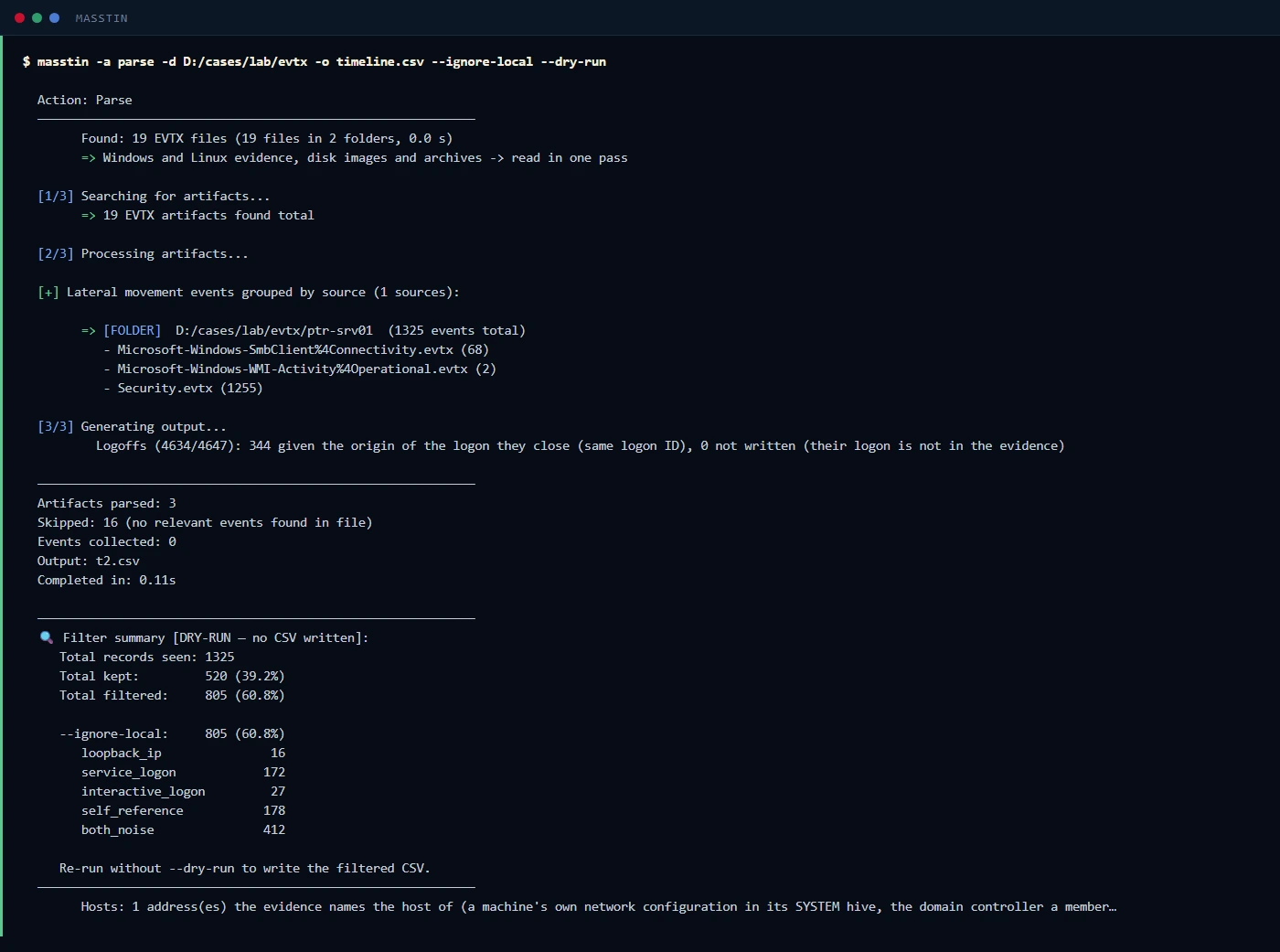
A real --dry-run on the logs of one lab server: of 1,325 records, --ignore-local would remove 805, and the summary says why for each group. No CSV is written.
Filtering without parsing again
Parsing twenty disk images takes its time. Filtering should not make you do it again, and it does not: merge applies the same filters to a timeline already made.
masstin -a merge -f timeline.csv --ignore-local --exclude-users @svc.txt -o filtered.csv
So the order I recommend is this: parse without filters, keep that complete timeline, and filter on copies. The complete one is your evidence. The filtered ones are working views, and you can make as many as you have questions.
Careful with what you remove
Two warnings, because these options can turn against you.
Machine accounts are not always noise. *$ cleans up a great deal, but a machine account authenticating from an address that is not its own is precisely what a relay attack leaves. And the viewer uses those rows to work out whose each address is. If you are going to join names to IPs, do it on the complete timeline.
Excluding the jump server is excluding where the attacker went through. If the attacker used JUMP01, which is the usual thing, --exclude-hosts JUMP01 has erased them from the case. Exclude what you have checked is noise, not what you assume.
And if what you want is not to see something, without removing it, that is better done in the viewer: the filters there do not touch the file.
$ comments