One command, any OS, any image
A ransomware incident hits your network. You receive a folder full of forensic images — Windows domain controllers, Linux web servers, file servers — all mixed together. Traditionally, you’d need to identify each OS, mount each image, run separate tools for Windows and Linux, then manually merge the results.
Masstin’s parse-image does it all in one command. It auto-detects the operating system of every partition inside every image and applies the right parser automatically:
- NTFS partition detected? → Extracts EVTX + UAL from the live volume, recovers deleted logs from VSS snapshots, deduplicates
- ext4 partition detected? → Extracts auth.log, secure, messages, audit.log, wtmp, btmp, lastlog, systemd-journald binary logs (
/var/log/journal/<machine-id>/*.journal[~]— essential on SSSD + Active Directory hosts), infers hostname and year
All results are merged into a single chronological CSV — Windows RDP logons and Linux SSH sessions side by side.
# Single image — OS auto-detected
masstin -a parse-image -f HRServer_Disk0.e01 -o timeline.csv

# Mixed Windows + Linux images — single merged timeline
masstin -a parse-image -f DC01.e01 -f ubuntu-web.vmdk -o incident.csv

# Point at evidence folder — finds all images, any OS
masstin -a parse-image -d /evidence/all_machines/ -o full_timeline.csv
For each image, masstin:
- Opens the forensic image (E01, dd/raw, or VMDK)
- Finds all partitions automatically (GPT and MBR)
- Identifies the OS per partition (NTFS signature or ext4 superblock)
- Extracts Windows artifacts from NTFS: EVTX + UAL from live volume
- Recovers deleted logs from VSS snapshots using vshadow-rs
- Extracts Linux logs from ext4: auth.log, wtmp, audit.log, etc.
- Parses each source with its native parser
- Merges and deduplicates into a single timeline
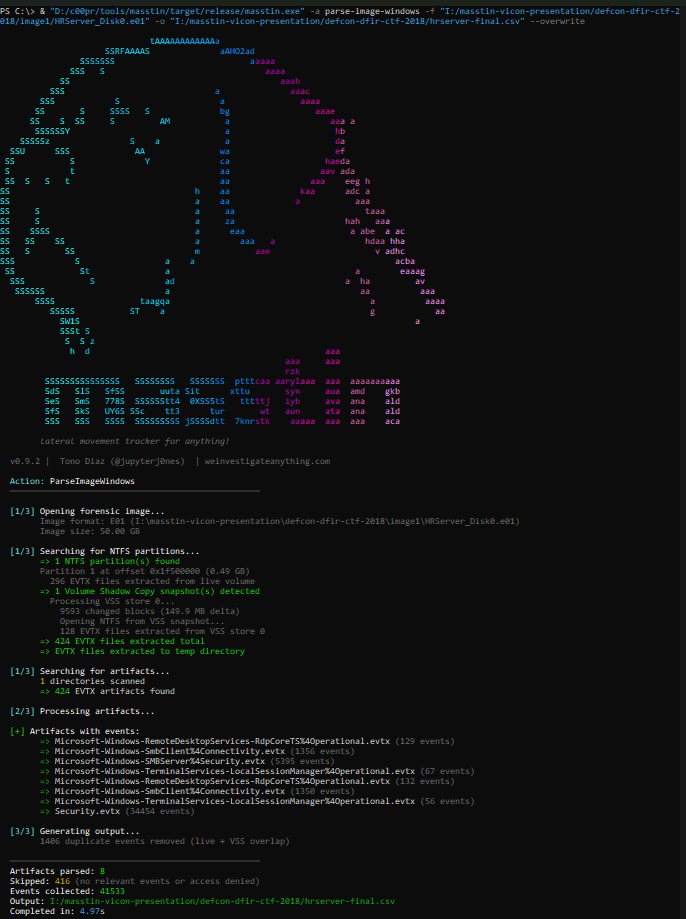
Example
Processing a 50 GB E01 image of a Windows Server where the attacker had cleared the event logs:
| Metric | Result |
|---|---|
| Image size | 50.00 GB |
| NTFS partition | 1 (offset 0x1F500000) |
| VSS snapshots | 1 (created 2018-08-07, 149.9 MB delta) |
| EVTX from live volume | 296 files |
| EVTX from VSS store | 128 files |
| Total after dedup | 424 unique EVTX files |
| Events from live | 6,947 |
| Events recovered from VSS | 34,586 |
| Total unique events | 41,533 |
| Duplicates removed | 1,406 |
| Processing time | ~5 seconds |
The VSS snapshot contained 34,586 events that were no longer on the live volume — including the Security.evtx with full authentication history that the attacker had cleared.
Descriptive source tracking
Every event in the output CSV includes a descriptive log_filename that tells you exactly where it came from — for both Windows and Linux sources:
HRServer_Disk0.e01:live:Security.evtx                    ← Windows: live volume
HRServer_Disk0.e01:vss_0:Security.evtx                   ← Windows: recovered from VSS snapshot 0
HRServer_Disk0.e01:UAL:Current.mdb                       ← Windows: UAL database
kali-linux.vmdk:partition_0:/var/log/auth.log             ← Linux: auth.log from ext4
ubuntu-server.e01:partition_0:/var/log/wtmp               ← Linux: wtmp login records
This allows the analyst to immediately distinguish between current evidence, recovered evidence, and the operating system of origin.
Multiple images, mixed operating systems
For large-scale incidents, point masstin at any combination of Windows and Linux forensic images:
masstin -a parse-image \
  -f DC01.e01 \
  -f SRV-FILE.e01 \
  -f linux-web.vmdk \
  -f ubuntu-db.e01 \
  -o full-incident-timeline.csv
Each image is processed independently: partitions detected, OS identified per partition, appropriate artifacts extracted (EVTX + UAL + VSS for Windows, auth.log + wtmp for Linux), and everything merged into a single timeline spanning all machines and operating systems.
Or simply point at an evidence folder:
masstin -a parse-image -d /evidence/ -o timeline.csv
Masstin recursively finds all E01, VMDK, and dd/raw images in the folder, auto-detects the OS of each, and produces one unified CSV.
Failed logon details
When masstin encounters a failed logon (Event 4625), the detail column now shows a human-readable description:
| detail | Meaning |
|---|---|
Wrong password (0xC000006A) |
Incorrect password |
User does not exist (0xC0000064) |
Account not found |
Account locked out (0xC0000234) |
Too many failed attempts |
Account disabled (0xC0000072) |
Account is disabled |
Expired password (0xC0000071) |
Password has expired |
BitLocker detection
Masstin automatically detects BitLocker-encrypted partitions by reading the Volume Boot Record signature. BitLocker replaces the standard NTFS signature at VBR offset 3 with -FVE-FS-. When detected, masstin:
- Shows a yellow warning with the exact partition offset
- Skips the encrypted partition (artifacts cannot be read without the recovery key)
- Reports the BitLocker count in the partition summary (e.g.,
Partitions: 1 NTFS, 1 BitLocker) - If all partitions are encrypted, shows a clear error:
All NTFS partitions are BitLocker-encrypted — recovery key required
This prevents the confusing scenario where thousands of EVTX files are extracted with correct sizes but zero events — the analyst immediately knows why.
VMDK format support
Masstin’s custom VMDK parser handles all common formats found in forensic evidence:
| Format | Source | How it works |
|---|---|---|
| Monolithic sparse | VMware Workstation default | Single .vmdk with sparse grain tables |
| Split sparse | VMware Workstation (split) | Descriptor .vmdk + -s001.vmdk, -s002.vmdk extents — auto-assembled |
| Flat (monolithic) | VMware ESXi / vSphere | Descriptor .vmdk + -flat.vmdk data file |
| streamOptimized | OVA exports, cloud templates, vSphere backups | Compressed grains with zlib — decompressed on-the-fly with grain caching |
Incomplete SFTP uploads: When a flat VMDK’s data file is missing (e.g., server-flat.vmdk), masstin automatically tries the .filepart extension (server-flat.vmdk.filepart) — common when SFTP transfers were interrupted during evidence collection.
LVM2 support
For Linux forensic images using Logical Volume Management (LVM2), masstin detects LVM partitions (GPT type GUID or MBR type 0x8E), reads the LVM metadata, and extracts log files from each logical volume. This covers enterprise Linux servers that commonly use LVM for disk management.
Per-image artifact grouping
When processing multiple images, the summary groups artifacts by image name — showing exactly which image produced lateral movement events:
[+] Artifacts with lateral movement events (9 of 10 images):
    => Windows Server 2019.vmdk (428 events total)
       - Security.evtx (406)
       - Microsoft-Windows-TerminalServices-LocalSessionManager%4Operational.evtx (10)
       - Current.mdb (12)
    => HRServer_Disk0.e01 (42943 events total)
       - Security.evtx (34454)
       - Microsoft-Windows-SMBServer%4Security.evtx (5395)
       ...
    => kali-linux.vmdk (5 events total)
       - wtmp (5)
How it works
Masstin uses pure Rust parsers for everything — no external tools, no mounting, no FUSE:
- Image access: E01 via
ewfcrate, VMDK via custom parser (sparse, split, flat, streamOptimized), dd/raw via direct file I/O - Partition detection: GPT and MBR tables parsed to find all partitions, including LVM2
- Encryption detection: BitLocker signature check (
-FVE-FS-) at VBR offset 3 — encrypted partitions are reported and skipped - OS identification: NTFS boot sector signature (
NTFS) or ext4 superblock magic (0xEF53) — each partition is classified independently - Windows extraction (NTFS partitions):
- EVTX from
Windows\System32\winevt\Logs\ - UAL databases from
Windows\System32\LogFiles\Sum\ - Scheduled Tasks XML from
Windows\System32\Tasks\ - VSS detection at offset
0x1E00, block descriptor mapping, snapshot reconstruction via vshadow-rs
- EVTX from
- Linux extraction (ext4 partitions):
- auth.log, secure, messages, audit.log from
/var/log/ - wtmp, btmp, utmp, lastlog, hostname
- Year inference from
dpkg.log, hostname from/etc/hostname
- auth.log, secure, messages, audit.log from
- Dual parsing: Windows artifacts →
parse_events, Linux artifacts →parse_linux - Merge and deduplication: both timelines merged chronologically, duplicates removed
Works on Windows, Linux, and macOS. Single binary, zero dependencies.
Related documentation
| Topic | Link |
|---|---|
| Masstin — main page | masstin |
| vshadow-rs — VSS parser | vshadow-rs |
| CSV format and event classification | CSV format |
| Security.evtx artifacts | Security.evtx |
$ comments