Why visualize in graphs
When you have 50 machines, thousands of logons, and need to find how the attacker moved, a CSV isn’t enough. You need to see the relationships — which machine connected to which, with what user, and when.
Neo4j turns masstin’s timeline into an interactive graph where every machine is a node and every lateral connection is an edge. This lets you see patterns that would be invisible in a table.
Data transformations
Masstin preserves the original values from the evidence as much as possible. Node names (hostnames, IPs) and properties are stored without transformation — SRV-FILE01 stays as SRV-FILE01, 10.10.1.50 stays as 10.10.1.50.
The only transformation applies to relationship types (the edge label, which represents the user account). This is a Cypher language restriction — relationship types must be valid identifiers and cannot contain dots, hyphens, or start with a number:
| What | Transformation | Example |
|---|---|---|
| Relationship type (user) | Dots, hyphens, spaces → _, UPPERCASE, strip @domain |
j.garcia@ACME.LOCAL → J_GARCIA |
| Node names (hostnames, IPs) | No transformation — original value preserved | SRV-FILE01 stays SRV-FILE01 |
| Properties (src_ip, etc.) | No transformation — original value preserved | 10.10.1.50 stays 10.10.1.50 |
| Usernames in properties | Only @domain suffix stripped |
j.garcia@ACME.LOCAL → j.garcia |
When writing queries, use the original values for node names and properties, and the normalized form only for relationship types.
The power of time filtering
This is the most valuable feature of masstin’s Neo4j visualization.
Masstin groups connections by source machine, destination machine, user, and logon type, and stores the earliest date of each group. This means that when you filter by time range, you automatically remove all connections that existed before that period.
Why is this so important? During incident response, the network is full of legitimate lateral movement: service accounts, admins doing their jobs, users accessing file shares. All that noise has been there for months. But the attacker’s connections are new.
By filtering for the period when you suspect the attack started, all the historical noise disappears and only connections seen for the first time in that time window remain. In seconds you go from an unreadable graph to a clear map of the attacker’s movement.
Installing Neo4j
| Platform | Installation |
|---|---|
| Windows | Download from neo4j.com/download. Install Neo4j Desktop, create a database, and start it. Access the browser at http://localhost:7474 |
| Linux | sudo apt install neo4j or download from neo4j.com/download. Start with sudo systemctl start neo4j. Access at http://localhost:7474 |
| macOS | brew install neo4j or download from neo4j.com/download. Start with neo4j start. Access at http://localhost:7474 |
| Docker | docker run -p 7474:7474 -p 7687:7687 -e NEO4J_AUTH=neo4j/password neo4j |
Load data with:
masstin -a load-neo4j -f timeline.csv --database localhost:7687 --user neo4j
Two loading modes: grouped vs ungrouped
The loader has two modes that answer different questions:
Grouped (default) produces one edge per unique (destination, user, logon_type) combination, with a count property showing how many events collapsed into it and time set to the earliest. This is the global picture — who talks to whom, how often, and via which logon type. Perfect for understanding the network topology, mapping trust boundaries, and presenting findings to stakeholders.
Ungrouped (--ungrouped) produces one edge per CSV row, preserving the real timestamp of every event. This is the mode for temporal path hunting — finding chronologically coherent attacker routes where each hop happened after the previous one. Always scope it with --start-time / --end-time; loading a full 250k-row timeline ungrouped will create an unusable graph.
| Mode | Use case | Edges |
|---|---|---|
| Grouped (default) | Global overview, topology, presentations | ~100-200 |
--ungrouped + time window |
Temporal path hunting, incident timeline | 1 per event |
Loader flags
| Flag | What it does |
|---|---|
--ungrouped |
One edge per CSV row. Preserves real timestamps for temporal path queries. |
--start-time "YYYY-MM-DD HH:MM:SS" |
Drop rows earlier than this before building the graph. |
--end-time "YYYY-MM-DD HH:MM:SS" |
Drop rows later than this. |
# Global overview (default) — who talks to whom
masstin -a load-neo4j -f timeline.csv --database localhost:7687 --user neo4j

# Temporal hunting — every event in a 30-minute window
masstin -a load-neo4j -f timeline.csv --database localhost:7687 --user neo4j \
        --ungrouped --start-time "2026-03-15 14:00:00" --end-time "2026-03-15 14:30:00"
IP and hostname unification
The same physical host often appears in different events as either an IP or a hostname. masstin builds an internal frequency map and resolves both to a single graph node automatically. Events 4778 (Session Reconnected) and 4779 (Session Disconnected) carry an x1000 weight in that map because Windows always populates both the workstation name and the IP reliably for those events — so a single 4778/4779 outweighs hundreds of conflicting normal events. External attacker IPs that have no matching session simply stay as IP nodes.
If you discover post-hoc that two nodes are still the same machine — for example because there was no 4778/4779 evidence in your dataset — you can fuse them with the merge-neo4j-nodes action shown at the end of this article.
Cypher Queries
View all lateral movement
MATCH (h1:host)-[r]->(h2:host)
RETURN h1, r, h2
Filter by time range
MATCH (h1:host)-[r]->(h2:host)
WHERE datetime(r.time) >= datetime("2026-03-12T00:00:00.000000000Z")
  AND datetime(r.time) <= datetime("2026-03-13T00:00:00.000000000Z")
RETURN h1, r, h2
ORDER BY datetime(r.time)
Exclude machine accounts and unresolved users
Machine accounts (ending in $) and connections without a resolved user (NO_USER) generate significant noise. Filtering them shows only human-initiated lateral movement:
MATCH (h1:host)-[r]->(h2:host)
WHERE datetime(r.time) >= datetime("2026-03-12T00:00:00.000000000Z")
  AND datetime(r.time) <= datetime("2026-03-13T00:00:00.000000000Z")
  AND NOT r.target_user_name ENDS WITH '$'
  AND NOT r.target_user_name = 'NO_USER'
RETURN h1, r, h2
ORDER BY datetime(r.time)
RDP-only connections (logon type 10)
MATCH (h1:host)-[r]->(h2:host)
WHERE datetime(r.time) >= datetime("2026-03-12T00:00:00.000000000Z")
  AND datetime(r.time) <= datetime("2026-03-13T00:00:00.000000000Z")
  AND NOT r.target_user_name ENDS WITH '$'
  AND r.logon_type = '10'
RETURN h1, r, h2
ORDER BY datetime(r.time)
Network logons only (logon type 3 — SMB, PsExec, WMI)
MATCH (h1:host)-[r]->(h2:host)
WHERE datetime(r.time) >= datetime("2026-03-12T00:00:00.000000000Z")
  AND datetime(r.time) <= datetime("2026-03-13T00:00:00.000000000Z")
  AND NOT r.target_user_name ENDS WITH '$'
  AND r.logon_type = '3'
RETURN h1, r, h2
ORDER BY datetime(r.time)
Service accounts by naming convention
If your organization uses a prefix for service accounts (e.g., SVC_):
MATCH (h1:host)-[r]->(h2:host)
WHERE datetime(r.time) >= datetime("2026-03-10T00:00:00.000000000Z")
  AND datetime(r.time) <= datetime("2026-03-14T00:00:00.000000000Z")
  AND (
    r.target_user_name STARTS WITH 'SVC'
    OR r.subject_user_name STARTS WITH 'SVC'
  )
RETURN h1, r, h2
ORDER BY datetime(r.time)
Filter by specific users, hosts, and IPs
When you’ve identified suspicious accounts or machines, this query traces their full activity. Remember to use transformed values (underscores, uppercase):
MATCH (h1:host)-[r]->(h2:host)
WHERE datetime(r.time) >= datetime("2026-03-12T00:00:00.000000000Z")
  AND datetime(r.time) <= datetime("2026-03-13T00:00:00.000000000Z")
  AND NOT r.target_user_name ENDS WITH '$'
  AND NOT r.target_user_name = 'NO_USER'
  AND r.logon_type IN ['3', '10']
  AND (
    (h1.name = 'WS_HR02' OR h2.name = 'WS_HR02')
    OR r.target_user_name IN ['ADM_DOMAIN', 'M_LOPEZ']
    OR r.subject_user_name IN ['ADM_DOMAIN', 'M_LOPEZ']
    OR r.src_ip IN ['10_99_88_77', '10_10_1_80']
  )
RETURN h1, r, h2
ORDER BY datetime(r.time)
Trace a specific user
MATCH (h1:host)-[r]->(h2:host)
WHERE r.target_user_name = 'ADM_DOMAIN'
RETURN h1, r, h2
ORDER BY datetime(r.time)
Most connected nodes (targets or pivot points)
Identify which machines have the most incoming connections:
MATCH (h1:host)-[r]->(h2:host)
RETURN h2.name AS target, COUNT(r) AS connections
ORDER BY connections DESC
LIMIT 10
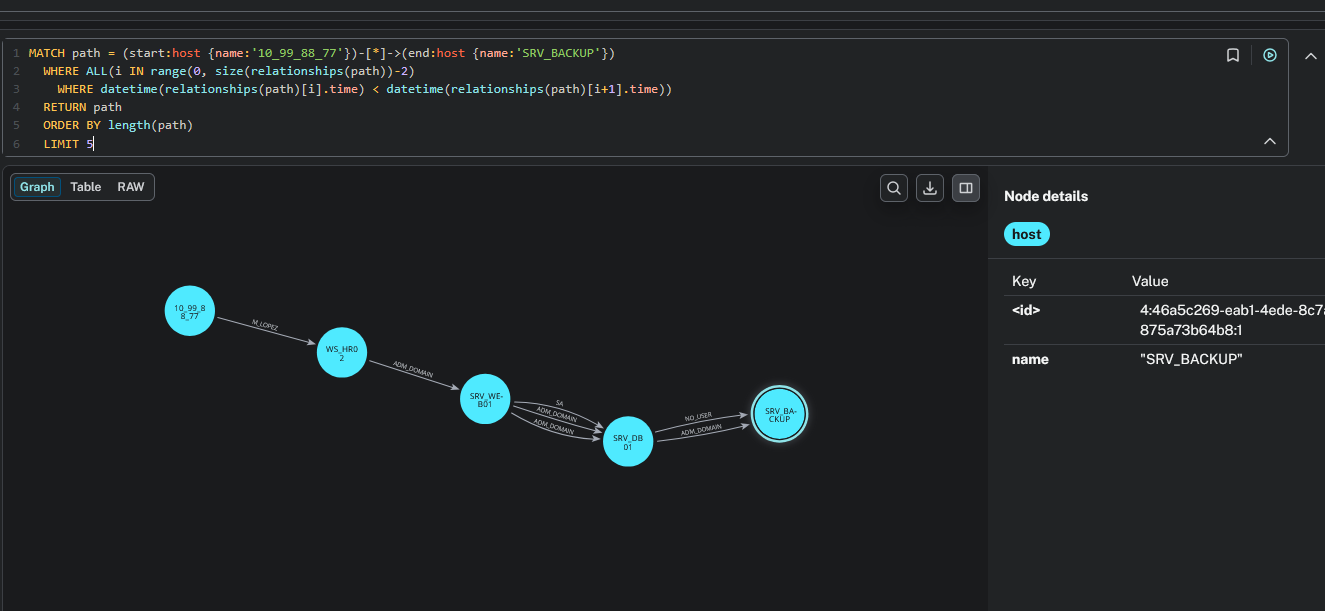
Temporal path between two hosts
This is one of the most powerful queries for incident reconstruction. It finds all paths between two hosts where each hop is chronologically later than the previous one — giving you the actual attack chain as it happened in time:
MATCH path = (start:host {name:'10_99_88_77'})-[*]->(end:host {name:'SRV_BACKUP'})
WHERE ALL(i IN range(0, size(relationships(path))-2)
  WHERE datetime(relationships(path)[i].time) < datetime(relationships(path)[i+1].time))
RETURN path
ORDER BY length(path)
LIMIT 5
Replace the start and end host names with your own. The result shows the attacker’s progression through the network, validated temporally:
Post-load: merge two nodes that are the same physical host
Sometimes the loader cannot tie an IP-shaped node to its hostname-shaped twin — typically because there were no 4778 or 4779 Security events in the dataset to act as authoritative evidence. masstin ships with a merge-neo4j-nodes action that fuses both nodes into one, transferring every relationship from the old node to the new one, preserving relationship type and properties, and then deleting the orphan node. It does not require APOC.
masstin -a merge-neo4j-nodes \
        --database bolt://localhost:7687 --user neo4j \
        --old-node "10.0.0.10" --new-node "WORKSTATION-A"
Internally, masstin introspects the relationship types touching the old node and runs one transfer query per type — because vanilla Cypher does not allow dynamic relationship types in CREATE, and masstin produces one type per target_user_name. If you prefer to run the Cypher manually for a single type :RELTYPE, the pattern is:
// Outgoing edges of one specific type
MATCH (new:host {name:'WORKSTATION-A'})
WITH new
MATCH (old:host {name:'10.0.0.10'})-[r:RELTYPE]->(target)
CREATE (new)-[nr:RELTYPE]->(target)
SET nr = properties(r)
DELETE r;

// Incoming edges of the same type
MATCH (new:host {name:'WORKSTATION-A'})
WITH new
MATCH (source)-[r:RELTYPE]->(old:host {name:'10.0.0.10'})
CREATE (source)-[nr:RELTYPE]->(new)
SET nr = properties(r)
DELETE r;

// Delete the orphan node once all of its edges are gone
MATCH (old:host {name:'10.0.0.10'}) DELETE old;
If you have APOC installed, the equivalent one-liner is CALL apoc.refactor.mergeNodes([new, old], {properties:'combine', mergeRels:false}). The masstin action covers the case where APOC is not available, which is most fresh installs.
$ comments